

The SaaS UX Library. Real Products, Real Patterns.
+299 SaaS products studied
Stop reverse-engineering SaaS UX on your own. SaasBoat gives designers, PMs, and devs a curated library of real-world SaaS screenshots, user flows, and UX audits. You ship better products, faster.
Real SaaS apps
Save hours & weeks of research time
Find depth in your research
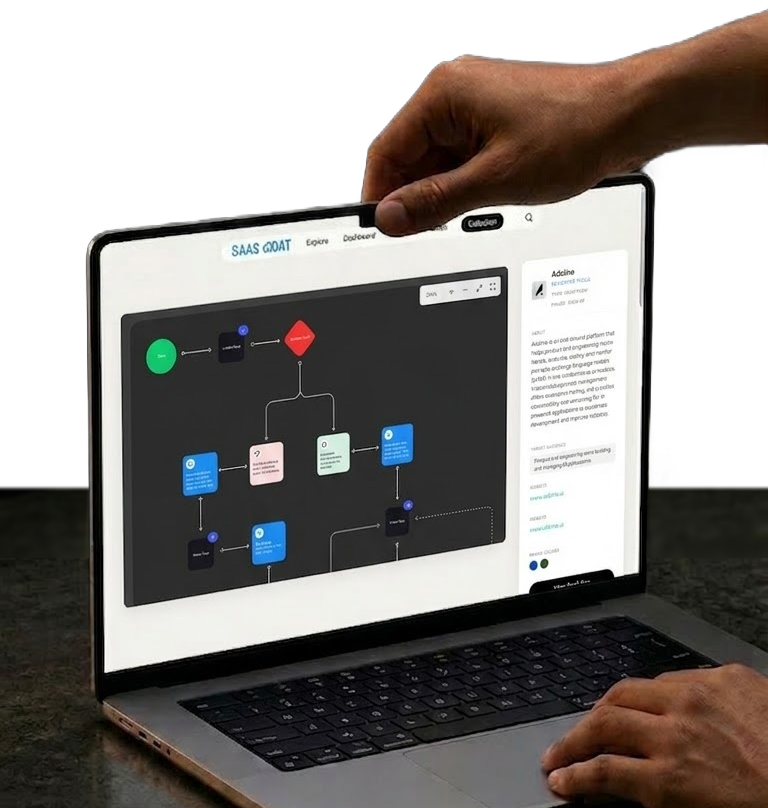

Real SaaS products analyzed inside SaaS Boat




Built for designers, PMs, and SaaS founders
Heuristic Evaluations
Learn UX Principles from Real SaaS Interfaces
Explore heuristic evaluations of real SaaS products using Nielsen’s usability principles. Identify usability issues, UX patterns, and interface decisions across dashboards, onboarding flows, and product interfaces. Study what works, what breaks, and how top SaaS teams design better user experiences.
80%


Visibility of System Status
8 Pass | 2 Fail
Asana
Interface Screenshots
Data-Driven Product Insights at a Glance
Explore high-fidelity screenshots from real SaaS dashboards and interfaces. Instantly see what features exist inside products, how they’re structured, and which UI patterns teams use to deliver functionality. Perfect for fast product research, UX inspiration, and data-driven design decisions.
Features
+4 new
23 Features insights
16 Standard
5 Common
2 Niche
User Flow Diagrams
Map the Full User Journey
Detailed user flow diagrams from real SaaS products — from onboarding to activation to upgrade. Understand how the best products guide users without friction.
Deep SaaS Research, All in One Place
From heuristic evaluations to micro-interaction breakdowns — SaasBoat is where serious product people do their research before they build.

Product Manager
Hey, can someone find onboarding flows from B2B SaaS products in our space?

You
Just pulled 6 relevant examples from SaaS Boat. Each one includes the full flow and notes on the key UX decisions.
Product Manager
Nice. That saves a ton of digging. 🎉
Trusted by Product Builders Everywhere
Over 180 designers, dev and PMs trust SaaS Boat in their research.
+
299
SaaS products documented with screenshots, flows & audits

Connects directly into your Figma projects
 into how teams , -lize, & better SaaS Experience


Simple Pricing
Pick the plan that matches how deep your research needs to go.
Sailor
Explore the basics
Browse the library and see how real SaaS products are built, no commitment needed.
Free
Plan Includes:
- All +280 SaaS apps with open graphs and target audience profiles
- 50 screenshots/month from real SaaS products
- Selected micro-interaction animations
- Figma Plugin — insert screenshots directly into your designs
- Notes and annotations
- Unlimited collections and sharing
- Compare any two items side by side
Officer (Monthly)
Full library, no limits
Everything in the library: flows, screenshots, animations, and 1,500+ heuristic evaluations — for designers and PMs building SaaS products.
$19.9
/month
Plan Includes:
- 1,500+ heuristic evaluations across all Nielsen UX principles
- 400+ UX and UI flow diagrams — full access and download
- 5,000+ marketing screenshots, no monthly cap
- All micro-interaction animations
- Light/dark mode variant switching
- Distraction-free viewing mode
- Brand color palettes and target audience insights per product
- Unlimited annotations and notes
Captain (Annual)
Best Value
Everything in Officer, billed annually. Save $178 a year — the obvious choice if you use SaaS Boat regularly.
$12.4
/month
$149 billed annually
Plan Includes:
- Everything in Officer — no exceptions
- 4.5 months free compared to monthly billing
- Priority support
Take your SaaS research to the next level
Everything You Need to Know About SaasBoat
What exactly is SaasBoat?
SaasBoat is a SaaS research library for product designers, PMs, and developers. We document real SaaS products in depth — capturing marketing screenshots, UI screenshots, user flow diagrams, heuristic evaluations, and micro-interaction animations — so you can learn from what’s already working.
What types of research does SaasBoat cover?
SaaS Boat focuses on real-world SaaS product research, not theory or generic design inspiration.
The library covers:
-
End-to-end SaaS user flows (onboarding, activation, upgrades, cancellation, etc.)
-
High-quality product and marketing screenshots
-
UX pattern analysis across multiple SaaS products
-
Heuristic evaluations based on established usability principles
-
Visual user flow diagrams and decision maps
-
Monetization and upgrade timing patterns
-
Empty states, error states, and retention flows
Every example comes from real, live SaaS products. The goal is to help you understand how successful SaaS companies structure decisions, reduce friction, and guide users toward activation and conversion.
Who is SaasBoat built for?
SaaS Boat is built for people who design, build, or grow SaaS products.
It’s especially useful for:
-
Product Designers and UX Designers
-
Product Managers
-
SaaS founders
-
Growth and PLG teams
-
Engineers working on SaaS onboarding and activation flows
If you’re making decisions about onboarding, pricing, upgrades, or user retention, SaaS Boat gives you real examples to reference instead of guessing or reinventing patterns from scratch.
How is SaasBoat different from tools like Mobbin or Screenlane?
Most UI inspiration tools focus on screens.
SaaS Boat focuses on flows and decisions.
While tools like Mobbin or Screenlane showcase isolated UI screens, SaaS Boat documents how users actually move through a product — step by step.
That includes:
-
What happens before and after a screen
-
How onboarding branches based on user behavior
-
When upgrade prompts appear
-
How cancellation flows are handled
-
How error states guide recovery
Instead of browsing static visuals, you see the structure behind the product experience. It’s built specifically for SaaS teams who need context, not just inspiration.
How often is the SaasBoat library updated?
The SaaS Boat library is updated on an ongoing (currently every Tuesday) basis.
New SaaS products, new flows, and new UX pattern breakdowns are added regularly. As products evolve, key flows are reviewed and updated to reflect meaningful changes.
SaaS Boat is designed to grow over time. Early users benefit from continuous additions as the library expands in depth and coverage across onboarding, activation, monetization, and retention flows.
Make better product decisions
From Research to Better Products
Starting at $19.9/month


